
Enable SQL Network
The network connection for MS SQL Express is disabled by default. Require to enable using SQL Server Configuration Manager.
In SQL Server Configuration Manager, expand SQL Server Network Configuration, and then select Protocols for <InstanceName>.
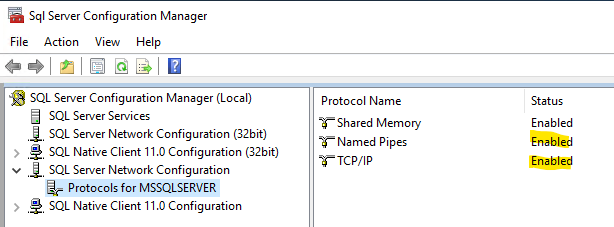
The default (unnamed) instance is displayed as MSSQLSERVER. If you installed a named instance, the name you provided is displayed. SQL Server Express installs as SQLEXPRESS, unless you changed the name during setup.
In the list of protocols, right-click the protocol you want to enable (TCP/IP), and then select Enable.
Server Name Mapping
If the server is isolated from domain network, add the server IP in the host file the to map the server name.
In the server that is establishing a connection to the MSSQL Express, locate the host file in C:\Windows\System32\drivers\etc\hosts and add the IP-Server mapping.

Note: Add a new line the bottom of the file, for example IP 10.10.0.200 mapped to server name SERVER1, comment with #, for example,
10.10.0.200 SERVER1 #Mapping of Staging Server Name to IP Address
Reference