
There are two main ways to prevent the SSL certificate option from appearing or being enforced during the installation of the SAP Business One client, depending on your specific scenario: during the interactive installation process, or after the installation has completed.
The first time when the SAP Client to be installed
The SSL certificate validation prompt appears during the installation of the DI API or the full client, specifically on the System Landscape Directory (SLD) configuration screen. This became a default option starting from version 10.0 SP 2411, where "Enable Certificate Validation" is checked by default.
To prevent it:
Run the setup wizard until you reach the SLD configuration page.
Uncheck the
Enable Certificate Validationcheckbox before clicking "Next" to proceed with the installation.
For a Silent/Unattended Installation
There is no specific command-line parameter documented to skip the SSL validation step directly. To bypass it, you must first run a standard interactive installation to generate an Config.XML configuration file. You can then edit this file to remove or alter the SSL-related entries before using it for the silent installation on other machines.
After Installation (Registry Fix)
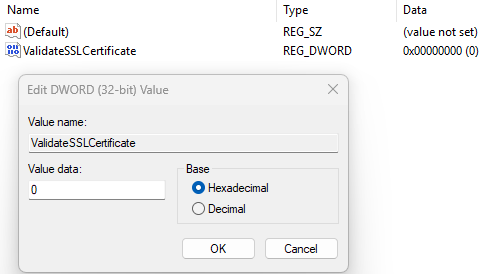
If the installation has already been completed with certificate validation enabled, you cannot remove the option from the installer, but you can disable the validation check itself through the Windows registry:
Open the Registry Editor.
Navigate to the following key:
HKEY_LOCAL_MACHINE\SOFTWARE\SAP\SAP Manage\SAP Business OneFind or create a new DWORD (32-bit) Value namedValidateSSLCertificate.Set its Value data to0to disable the validation.Click OK and restart the SAP Business One client. This will effectively bypass the certificate check that was enabled during installation.
If you need to disable SSL for communication between specific server components, you will typically need to find the "Disable SSL" option within that server's own configuration tool. For example, in a Transnet Server configuration, it is an option within the Server Settings menu. For other services like the SLD or mobile app connections, you may need to reconfigure them to not require SSL or to use a non-SSL port (like port 8080 instead of 8443).